

Home
›
Work Environments & Trends
›
Find your ideal Legamaster display in 4 steps – including delivery, setup & support

Find your ideal Legamaster display in 4 steps – including delivery, setup & support
by Anna Ullmann on Jan 08, 2026Displays for meetings, training, and digital signage, simply explained.
Digital collaboration is now part of everyday life – whether in the meeting room, training room or reception area. Traditional projectors or televisions quickly reach their limits: the brightness is not right, cable clutter is annoying, the technology is prone to errors, and operation is complicated.
This is where professional displays from Legamaster come into play. The edding Group brand has been developing solutions for visual communication for over 60 years – from whiteboards to digital touchscreens. The current product lines DISCOVER 3 (Professional Displays) and EVOLVE PRO (interactive touchscreens) are specially designed for continuous professional use and offer everything modern companies and educational institutions need.
Particularly exciting: Legamaster is part of the "1% for the Planet" initiative – meaning 1% of the revenue generated with EVOLVE PRO and DISCOVER 3 is donated to environmental and sustainability projects.
Before delivery, setup, and introduction can begin, you first need the right display. To make the selection easy, you can use four simple questions as a guide. In this article, we'll walk you through finding the right screen – including all-round carefree on-site service.
Table of Contents

|

|
1. Advantages at a glance
- User-friendly: The intuitive user interface allows for quick and easy use of the screen.
- Image quality: IPS panels with UHD resolution ensure sharp images and vibrant colors.
- Durable: Robust materials, designed for long-term use – including a 5-year warranty for maximum security.
- Versatile: Ideal for presentations, lessons, (virtual) meetings, workshops, brainstorms, and training sessions.
- Compatibility: Works seamlessly with Windows, Mac, and ChromeOS – both wired and wireless.
- Environmentally friendly: Energy-efficient design, low operating costs, and certified by "1% for the Planet".
- Interactive (touchscreens only): Direct laptop control via the screen and easy annotation of Office documents & PDFs.
- Services: We handle delivery, installation, commissioning, and provide reliable after-sales support.
- Android operating system: All displays come with integrated Android – no external PC required. An OPS module (with or without Windows license) can optionally be integrated.

2. Legamaster handles delivery, setup, and support
We offer a complete solution with carefully compiled packages – each combining the right display with a compatible mounting system and professional installation.
From delivery to professional installation, commissioning, and a brief introduction, we handle the entire process – simple and straightforward for you. And if support is ever needed, our dedicated after-sales service with a ticket system is reliably available at any time.
The all-round carefree process
Here's how it works when you purchase a Legamaster display package from us:
- Selection of the appropriate package: You choose one of 18 screen packages including mounting and installation from us. Details on the services included are available on-site or in the webshop. Your contact details will then be forwarded to us.
- Telephone coordination: Our service partner will contact you by phone to check the local conditions and ensure a smooth process. If additional work is required, this will be discussed with you in advance.
- Mounting, commissioning & instruction: On the agreed date, our service partner will professionally deliver and mount the screen, commission it, and instruct you on the most important functions. Confirmation of correct execution is important for potential warranty claims.
- Completion & confirmation: Legamaster confirms the mounting and commissioning. The order is complete – we wish you much joy and success with your Legamaster screen!
3.1 Which screen is right for my requirements?
The first question is always: How do you want to use the screen?
Option A: DISCOVER 3 – Professional Display
- Presentation tool: High-performance display for clear and reliable content presentation.
- Reliable digital signage: Designed for daily use up to 24/7 – significantly more durable and stable than commercially available smart TVs.
- Flexible orientation & tiling: Supports portrait and landscape formats as well as combining multiple displays for video walls.
- Effective meeting support: Presentations can be easily shared – ideal for clear communication in meetings.
- High-quality video conferencing: Displays video calls in crystal clear quality – ideal for professional remote meetings.
- Strong brand presence: Perfect for 4K content in reception areas or public spaces – strengthens your brand impact.
Option B: EVOLVE PRO – Interactive Touch Display
- Pure teamwork tool: Fully interactive touchscreen – ideal for workshops, training, and creative collaboration.
- Digital whiteboarding: Write, draw, annotate – notes can be shared directly, without markers or flip charts.
- Efficient document collaboration: Review and annotate documents directly on the screen – ideal for teams.
- Ready for hybrid meetings: Optional with integrated camera & microphone – perfect for remote meetings.
- Wireless screen sharing: Present via AirPlay, Miracast, or smartphone – completely cable-free.
- EDLA-certified: Full access to the Google Play Store – ideal for Google Meet, Microsoft Teams, and other apps.
3.2 Finding the right size
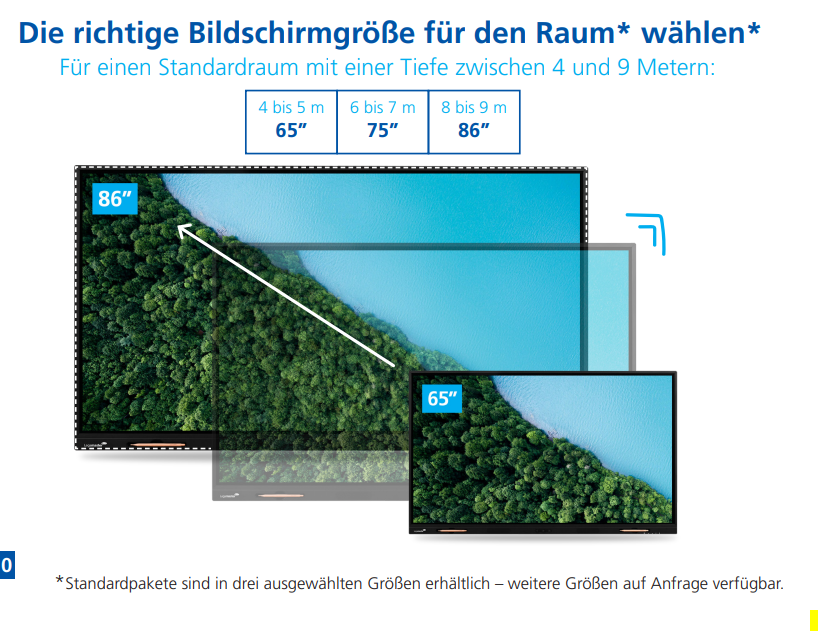
The second question is: How big does the screen need to be for everyone to see well?
Practical rule of thumb: For an optimal presentation experience, plan approx. 10 inches (25.4 cm) per meter of room depth.
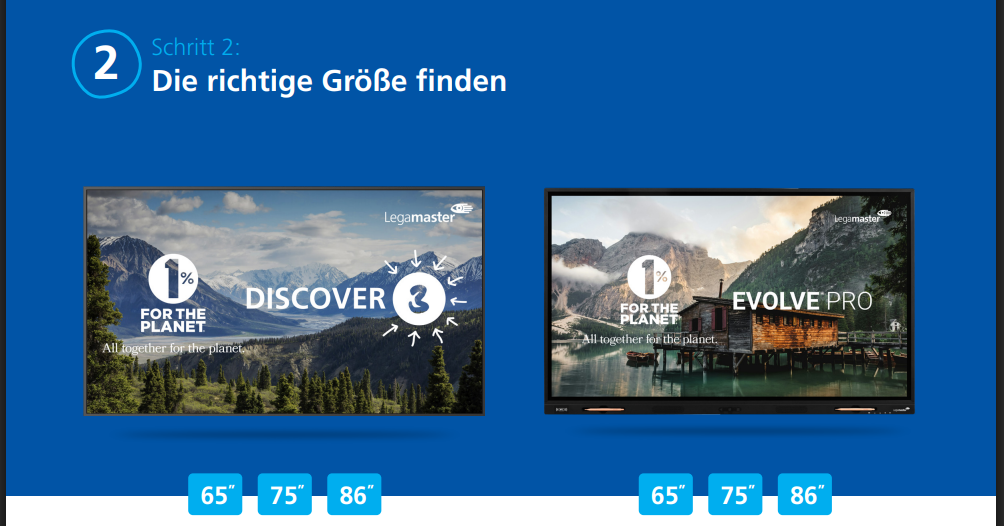
- Room depth 4–5 m → approx. 65"
- Room depth 6–7 m → approx. 75"
- Room depth 8–9 m → approx. 86"
If you're unsure, a simple guide helps: Where is the last row – and could you easily read a small-font PowerPoint slide from there?
If not: choose one size larger.
 |
 |
3.3 Combine your screen with the right mounting solution

MoTion Pylon System
for DISCOVER 3 and EVOLVE PRO
- Aesthetically pleasing: Sleek, modern design
- Adaptive height adjustment for optimal use
- Anti-collision system for maximum safety
- Start/stop button
- Integrated cable management

VESA Wall Mount
for DISCOVER 3 and EVOLVE PRO
- Cost-effective, space-saving solution
- Slim, wall-mounted design
- Can support up to 98 inches depending on the model
- Ideal for rooms with a clear orientation

MoTion Mobile System MS-12S
for DISCOVER 3 and EVOLVE PRO
- Mobile – flexibly movable between rooms
- Adaptive height adjustment
- Perfect for workshops, schools & training rooms
- Anti-collision system for safe operation
3.4 Enhancing your product with suitable accessories
Spitfire conference camera
4K Ultra HD
- Ideal for live video streaming, video conferencing, home video recording and online training
- Plug-and-play solution
- 4K Ultra HD resolution
- 96° field of view – for up to 8 people
AGORA all-in-one video soundbar
4K Ultra HD
- Plug-and-play solution – no software or downloads required
- AI lens, fast facial recognition, distortion-free field of view
- Two powerful full-range speakers (front & rear)
- Voice pickup up to 10 m
OPS Plug-in PC
with Windows 11 license
- 12th generation Intel® Core™ processor
- Fast connection to wired & wireless networks
- Easy connection of peripherals such as keyboards
- Windows 11 license included (also available without license)
AirServer Connect 3
–
- Wireless screen sharing solution
- Up to 12 simultaneous streams
- Compatible with AirPlay, Google Cast and Miracast
- Start guide & screen extension included
- Connection via a single USB-C cable
We would be happy to advise you personally
Choosing the right display is often more complex than it first appears – room size, lighting conditions, usage scenarios, existing technology and individual requirements all play a major role.
To ensure you get a solution that truly suits your rooms and your daily work, we would be happy to advise you personally – from selection to complete setup.
We are your contact in Wiesbaden and the entire Rhine-Main area.
Phone: 0611 9284730
Email: info@wiepa.com
Whether it's a single meeting room, multiple locations or complete setups:
Together, we will find the optimal solution – including delivery, installation, introduction and support.
Just get in touch – we'll be happy to help.


